Installing OpenLDAP with Docker
Jul 24, 2023
8 minute read
Environment
OS
Docker
LDAP
Ubuntu 18
20.10
2.4.57
Installing OpenLDAP
1
2
3
4
5
6
7
8
docker run -d \
\
\
= always \
LDAP_ORGANISATION = "caizhe" \
LDAP_DOMAIN = "caizhe.org" \
LDAP_ADMIN_PASSWORD = "111111" \
Installing the web UI (PHPLDAPadmin)
1
2
3
4
5
6
7
docker run -d \
\
\
\
PHPLDAPADMIN_HTTPS = false \
PHPLDAPADMIN_LDAP_HOSTS = 192.168.1.100 \
Test command
1
ldapsearch -x -H ldap:/// -D "cn=admin,dc=caizhe,dc=org" -w 111111 -b "dc=caizhe,dc=org" -LLL
Or run it inside the container:
1
ldapsearch -x -H ldap:/// -D "cn=admin,dc=caizhe,dc=org" -w 111111 -b "dc=caizhe,dc=org" -LLL
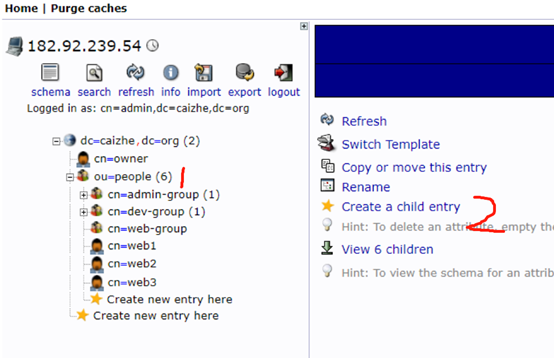
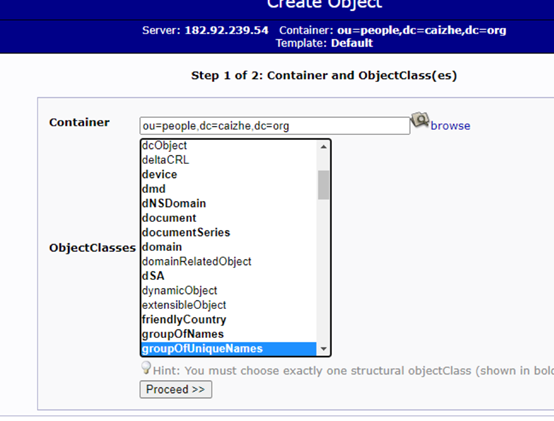
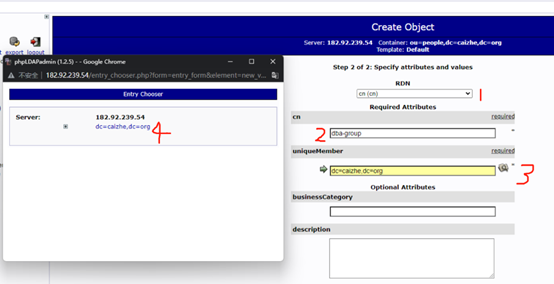
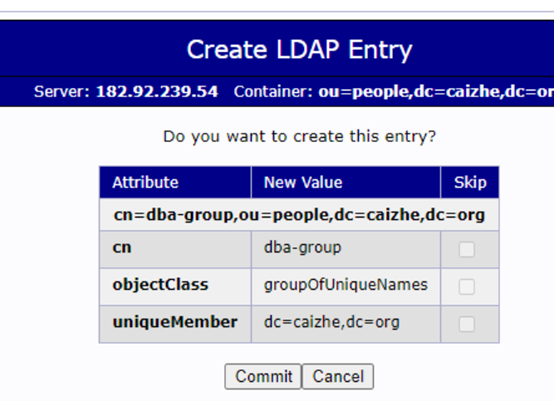
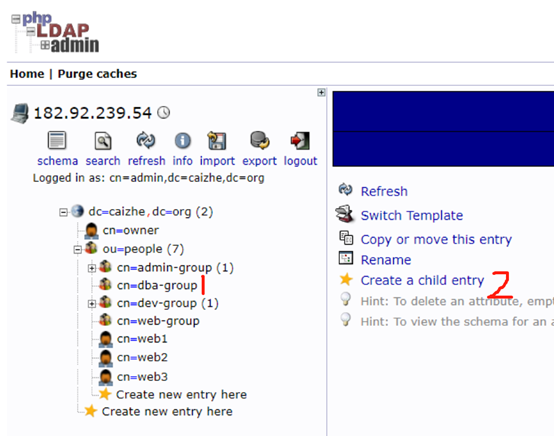
Creating a group
Before adding users in LDAP you need a group.
Choose
default
.
You can pick any organizational unit here — you will change it later anyway.
Submit once you have confirmed everything is correct and the group is created.
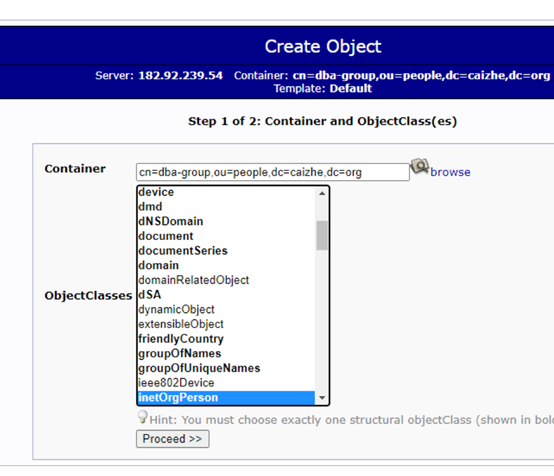
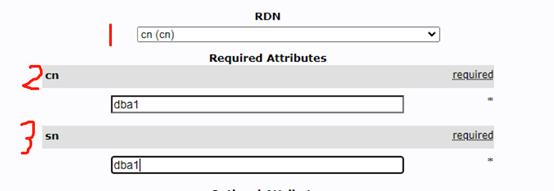
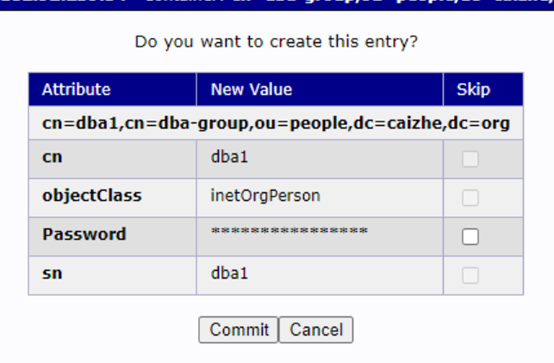
Creating a user
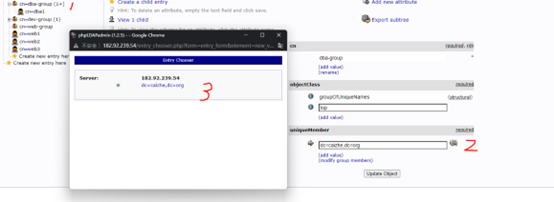
LDAP groups and users are not linked by default, so we need to add the user we just created to the
dba-group
group.
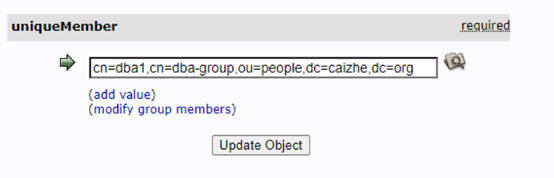
The end result looks like this — just submit with “Update~”.
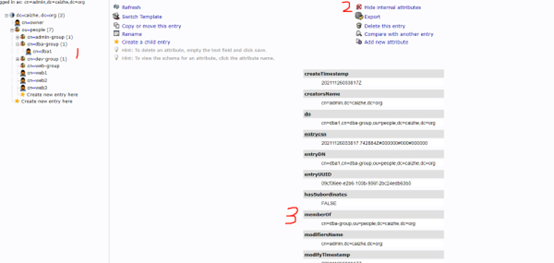
The user is now a member of the group. Notice the
memberOf
attribute: that is exactly what our Jenkins group authorization reads to decide access. (I really want to ask the author why it cannot read the DN and make the decision from the OU.)
Password policy
Password policy is normally handled with
ppolicy
. You can check whether the module is loaded with:
 1
 2
 3
 4
 5
 6
 7
 8
 9
10
11
12
root@openldap-host:/etc/ldap# slapcat -n 0 | grep -i module
dn: cn = module{ 0} ,cn= config
objectClass: olcModuleList
cn: module{ 0}
olcModulePath: /usr/lib/ldap
olcModuleLoad: { 0} back_mdb
olcModuleLoad: { 1} memberof
olcModuleLoad: { 2} refint
structuralObjectClass: olcModuleList
olcAttributeTypes: { 15}( 1.3.6.1.4.1.4754.1.99.1 NAME 'pwdCheckModule' DESC
'Loadable module that instantiates "check_password() function' EQUALITY cas
op AUXILIARY MAY pwdCheckModule )
If it is not there, load the module explicitly with
ldapadd
. Create an LDIF file:
1
2
3
4
5
cat load-ppolicy-mod.ldif
dn: cn = module{ 0} ,cn= config
changetype: modify
add: olcModuleLoad
olcModuleLoad: ppolicy.la
Load it:
1
ldapadd -Y EXTERNAL -H ldapi:/// -f load-ppolicy-mod.ldif
Verify it loaded:
 1
 2
 3
 4
 5
 6
 7
 8
 9
10
11
12
13
root@openldap-host:/etc/ldap# slapcat -n 0 | grep -i module
dn: cn = module{ 0} ,cn= config
objectClass: olcModuleList
cn: module{ 0}
olcModulePath: /usr/lib/ldap
olcModuleLoad: { 0} back_mdb
olcModuleLoad: { 1} memberof
olcModuleLoad: { 2} refint
olcModuleLoad: { 3} ppolicy.la
structuralObjectClass: olcModuleList
olcAttributeTypes: { 15}( 1.3.6.1.4.1.4754.1.99.1 NAME 'pwdCheckModule' DESC
'Loadable module that instantiates "check_password() function' EQUALITY cas
op AUXILIARY MAY pwdCheckModule )
Check the storage backend used by the existing LDAP policy database — you will find they are all
mdb
:
1
2
3
4
5
6
7
8
root@openldap-host:/etc/ldap# ldapsearch -LLL -Y EXTERNAL -H ldapi:/// -b cn = config olcDatabase | grep mdb
SASL/EXTERNAL authentication started
SASL username: gidNumber = 0+uidNumber= 0,cn= peercred,cn= external,cn= auth
SASL SSF: 0
dn: olcDatabase ={ 1} mdb,cn= config
olcDatabase: { 1} mdb
dn: olcOverlay ={ 0} memberof,olcDatabase={ 1} mdb,cn= config
dn: olcOverlay ={ 1} refint,olcDatabase={ 1} mdb,cn= config
Create the DN for the default password policy:
1
2
3
4
5
6
7
root@openldap-host:/etc/ldap# cat pwpolicyoverlay.ldif
dn: olcOverlay = ppolicy,olcDatabase={ 1} mdb,cn= config
objectClass: olcOverlayConfig
objectClass: olcPPolicyConfig
olcOverlay: ppolicy
olcPPolicyDefault: cn = default,dc= caizhe,dc= org
olcPPolicyHashCleartext: TRUE
Update the database:
1
2
3
4
5
root@498d5b127557:/# ldapadd -Y EXTERNAL -H ldapi:/// -f pwpolicyoverlay.ldif
SASL/EXTERNAL authentication started
SASL username: gidNumber = 0+uidNumber= 0,cn= peercred,cn= external,cn= auth
SASL SSF: 0
adding new entry "olcOverlay=ppolicy,olcDatabase={1}mdb,cn=config"
Add the default policy rules.
(For testing purposes the password expiry here is set to 100 seconds, with a warning 60 seconds before expiry.)
 1
 2
 3
 4
 5
 6
 7
 8
 9
10
11
12
13
14
15
16
17
18
19
20
21
22
23
cat ldap-pwpolicies.ldif
dn: cn = default,dc= caizhe,dc= org
objectClass: inetOrgPerson
objectClass: pwdPolicyChecker
objectClass: pwdPolicy
cn: pwpolicy
sn: pwpolicy
pwdAttribute: userPassword
pwdMinAge: 0
pwdMaxAge: 100
pwdInHistory: 5
pwdCheckQuality: 2
pwdMinLength: 8
pwdExpireWarning: 60
pwdGraceAuthNLimit: 3
pwdLockout: TRUE
pwdLockoutDuration: 0
pwdMaxFailure: 0
pwdFailureCountInterval: 0
pwdReset: TRUE
pwdMustChange: TRUE
pwdAllowUserChange: TRUE
pwdSafeModify: FALSE
Update the password policy on slapd (creating a default policy named
default
):
1
2
3
4
5
ldapadd -Y EXTERNAL -H ldapi:/// -f ldap-pwpolicies.ldif
SASL/EXTERNAL authentication started
SASL username: gidNumber = 0+uidNumber= 0,cn= peercred,cn= external,cn= auth
SASL SSF: 0
adding new entry "cn=default,dc=caizhe,dc=org"
Testing
Change a password to something that does not meet the requirements:
1
2
3
4
5
6
7
8
root@openldap-host:/etc/ldap# ldappasswd -H ldapi:/// -Y EXTERNAL -S "cn=ccc,cn=default,ou=pwpolicy,dc=caizhe,dc=org"
New password:
Re-enter new password:
SASL/EXTERNAL authentication started
SASL username: gidNumber = 0+uidNumber= 0,cn= peercred,cn= external,cn= auth
SASL SSF: 0
Result: Constraint violation ( 19)
Additional info: Password fails quality checking policy
Log in as a new user and check the password expiry:
 1
 2
 3
 4
 5
 6
 7
 8
 9
10
11
12
13
14
15
16
17
18
19
20
21
22
23
24
25
26
64c1e4ea conn = 1068 fd = 14 ACCEPT from IP = 192.168.0.131:50662 ( IP = 0.0.0.0:389)
64c1e4ea conn = 1068 op = 0 BIND dn = "cn=aaa,dc=caizhe,dc=org" method = 128
64c1e4ea conn = 1068 op = 0 BIND dn = "cn=aaa,dc=caizhe,dc=org" mech = SIMPLE ssf = 0
64c1e4ea ppolicy_bind: Setting warning for password expiry for cn = aaa,dc= caizhe,dc= org = 21 seconds # 21 seconds until expiry
64c1e4ea conn = 1068 op = 0 RESULT tag = 97 err = 0 text =
64c1e4ea conn = 1068 op = 1 SRCH base = "" scope = 0 deref = 3 filter = "(objectClass=)"
64c1e4ea conn = 1068 op = 1 SRCH attr = subschemaSubentry
64c1e4ea conn = 1068 op = 1 SEARCH RESULT tag = 101 err = 0 nentries = 1 text =
64c1e4ea conn = 1068 op = 2 SRCH base = "cn=Subschema" scope = 0 deref = 3 filter = "(objectClass=subschema)"
64c1e4ea conn = 1068 op = 2 SRCH attr = createTimestamp modifyTimestamp
64c1e4ea conn = 1068 op = 2 SEARCH RESULT tag = 101 err = 0 nentries = 1 text =
64c1e4ea conn = 1068 op = 3 SRCH base = "" scope = 0 deref = 0 filter = "(objectClass=)"
64c1e4ea conn = 1068 op = 3 SRCH attr = namingContexts subschemaSubentry supportedLDAPVersion supportedSASLMechanisms supportedExtension supportedControl supportedFeatures vendorName vendorVersion + objectClass
64c1e4ea conn = 1068 op = 3 SEARCH RESULT tag = 101 err = 0 nentries = 1 text =
64c1e4ea conn = 1068 op = 4 SRCH base = "" scope = 0 deref = 0 filter = "(objectClass=)"
64c1e4ea conn = 1068 op = 4 SRCH attr =
64c1e4ea conn = 1068 op = 4 SEARCH RESULT tag = 101 err = 0 nentries = 1 text =
64c1e4ea conn = 1068 op = 5 SRCH base = "cn=Subschema" scope = 0 deref = 3 filter = "(objectClass=)"
64c1e4ea conn = 1068 op = 5 SRCH attr = hasSubordinates objectClass
64c1e4ea conn = 1068 op = 5 SEARCH RESULT tag = 101 err = 0 nentries = 1 text =
64c1e4ea conn = 1068 op = 6 SRCH base = "dc=caizhe,dc=org" scope = 0 deref = 3 filter = "(objectClass=)"
64c1e4ea conn = 1068 op = 6 SRCH attr = hasSubordinates objectClass
64c1e4ea conn = 1068 op = 6 SEARCH RESULT tag = 101 err = 32 nentries = 0 text =
64c1e4ea conn = 1068 op = 7 SRCH base = "cn=config" scope = 0 deref = 3 filter = "(objectClass=*)"
64c1e4ea conn = 1068 op = 7 SRCH attr = hasSubordinates objectClass
64c1e4ea conn = 1068 op = 7 SEARCH RESULT tag = 101 err = 32 nentries = 0 text =
Note: existing accounts are not affected — only users added afterwards are subject to the password policy.
Create a configuration file:
 1
 2
 3
 4
 5
 6
 7
 8
 9
10
11
12
13
14
15
16
17
18
19
20
21
22
23
24
25
26
27
28
29
30
31
32
33
34
35
36
37
38
39
40
41
42
43
44
45
46
47
48
49
50
51
52
53
54
55
56
57
58
59
60
61
62
63
64
65
66
67
68
69
70
71
72
73
74
<? php // My SSP configuration
$keyphrase = "mysecret" ;
$debug = true ;
$use_captcha = false ;
$ldap_url = "ldap://192.168.1.250:389" ;
$ldap_binddn = "CN=admin,DC=innovsharing,DC=com" ;
$ldap_bindpw = "111111" ;
$ldap_base = "dc=innovsharing,dc=com" ;
$ldap_filter = "(&(objectClass=inetOrgPerson)(cn={login}))" ;
$use_sms = false ;
$use_questions = false ;
$who_change_password = "user" ;
$show_extended_error = true ;
$pwd_show_policy_pos = "above" ;
$pwd_show_policy = "always" ;
#$pwd_no_reuse = true;
#$ldap_use_exop_passwd = true;
#$ldap_use_ppolicy_control = true;
#$pwd_min_lower = 1;
#$pwd_min_upper = 1;
#$pwd_min_digit = 1;
$pwd_min_length = 8 ;
#$pwd_max_length = 16;
#$hash = "MD5";
## Token
# Use tokens?
# true (default)
# false
$use_tokens = true ;
# Crypt tokens?
# true (default)
# false
$crypt_tokens = true ;
# Token lifetime in seconds
$token_lifetime = "3600" ;
## Mail
# LDAP mail attribute
$mail_attributes = array ( "mail" , "gosaMailAlternateAddress" , "proxyAddresses" );
# Get mail address directly from LDAP (only first mail entry)
# and hide mail input field
# default = false
$mail_address_use_ldap = false ;
# Who the email should come from
$mail_from = "xxx@innovsharing.com" ;
$mail_from_name = "Self Service Password" ;
$mail_signature = "" ;
# Notify users anytime their password is changed
$notify_on_change = false ;
# PHPMailer configuration (see https://github.com/PHPMailer/PHPMailer)
$mail_sendmailpath = '/usr/sbin/sendmail' ;
$mail_protocol = 'smtp' ;
$mail_smtp_debug = 0 ;
$mail_debug_format = 'error_log' ;
$mail_smtp_host = 'smtp.exmail.qq.com' ;
$mail_smtp_auth = true ;
$mail_smtp_user = 'xxxxx@innovsharing.com' ;
$mail_smtp_pass = 'xxxxxxxxxxxxx' ;
$mail_smtp_port = 465 ;
$mail_smtp_timeout = 30 ;
$mail_smtp_keepalive = false ;
$mail_smtp_secure = 'ssl' ;
$mail_smtp_autotls = true ;
$mail_smtp_options = array ();
$mail_contenttype = 'text/plain' ;
$mail_wordwrap = 0 ;
$mail_charset = 'utf-8' ;
$mail_priority = 3 ;
?>
Run the new container:
docker run -p 9080:80 --restart=always --name selfServicePassword -v $PWD/config.inc.php:/var/www/conf/config.inc.local.php -itd docker.io/ltbproject/self-service-password:1.5
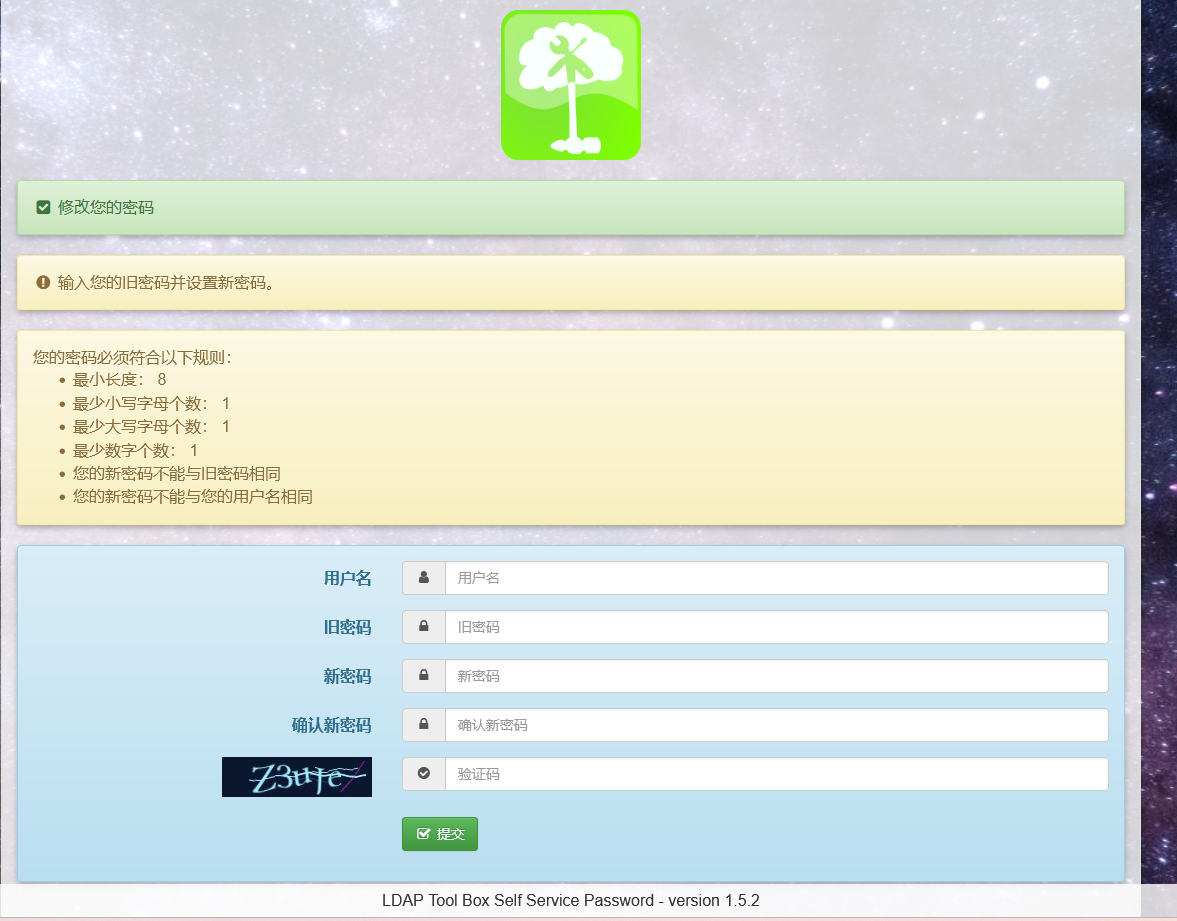
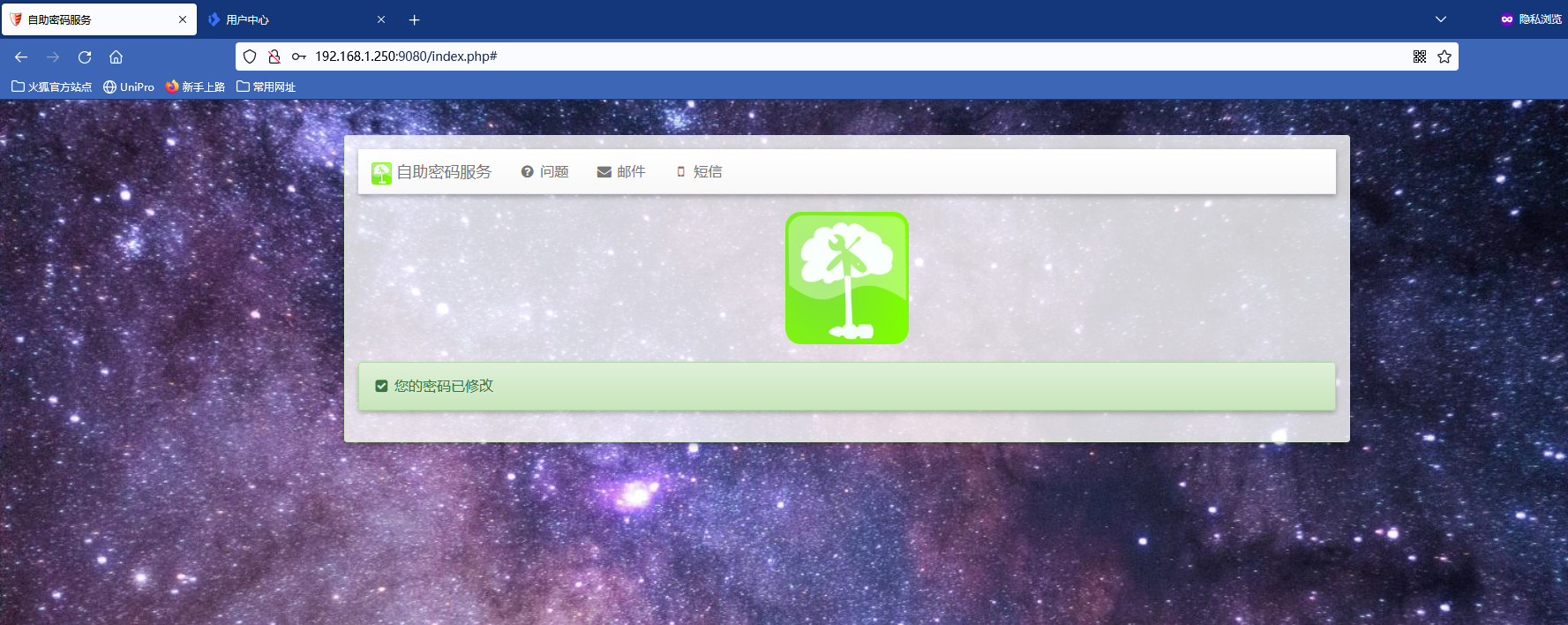
From there you can change passwords directly (and reset a forgotten password by email).
Expiry reminders
SSP makes changing passwords easy, but it has two drawbacks:
There is no reminder before the password expires;
You cannot change a password that has already expired (AD supports this, but OpenLDAP keeps reporting a bad password).
Here is a script that covers both:
 1
 2
 3
 4
 5
 6
 7
 8
 9
10
11
12
13
14
15
16
17
18
19
20
21
22
23
24
25
26
27
28
29
LDAP_HOSTURI = "ldap://192.168.1.250:389"
LDAP_ROOTDN = "cn=admin,dc=innovsharing,dc=com"
LDAP_ROOTPW = "111111"
LDAP_SEARCHBASEDN = "dc=innovsharing,dc=com"
LDAP_SEARCHFILTER = "(&(cn=*)(objectClass=inetOrgPerson))"
LDAP_SEARCHCOMM = "ldapsearch -x -H ${ LDAP_HOSTURI } -D ${ LDAP_ROOTDN } -LLL -w ${ LDAP_ROOTPW } ${ LDAP_SEARCHFILTER } "
EXPIRE_DAY = 165 # LDAP expires passwords after 180 days; remind on day 165, 15 days early
${ LDAP_SEARCHCOMM } -b ${ LDAP_SEARCHBASEDN } dn| awk '{print $2}' > /tmp/1.log
for i in ` cat /tmp/1.log`
do
echo $i
ModifyTime = ` ${ LDAP_SEARCHCOMM } -b $i +| grep modifyTimestamp| awk '{print $NF}' | cut -c1-8`
ModifyTime = $( date -d " ${ ModifyTime } " +%s)
echo ${ ModifyTime }
NowTime = $( date +%s)
diff = $(( ( NowTime - ModifyTime) / 86400 ))
echo ${ diff }
if (( ${ diff } > ${ EXPIRE_DAY ))
then
echo "exipire"
Mail= ` ${ LDAP_SEARCHCOMM } -b $i mail | grep mail| awk '{print $2}' `
echo "Hi,Please change your password. It will expire." | mail -s "Accont expire warning" ${ mail }
else
echo "no exipire"
fi
done
rm -f /tmp/1.log
Put it in cron and run it once a day.
A few basic tools are required (
mail
,
gawk
,
ssmtp
):
1
apt install mailutils gawk ssmtp
Fill in the mail configuration:
1
2
3
4
5
6
7
8
9
vim /etc/ssmtp/ssmtp.conf
root = xxx@innovsharing.com
mailhub = smtp.exmail.qq.com:465
AuthUser = xxx@innovsharing.com
AuthPass = xxxxxxx
UseTLS = Yes
-------------------------
vim /etc/ssmtp/revaliases
root:xxx@innovsharing.com:smtp.exmail.qq.com:465
Send a test mail to confirm:
1
echo "nei rong" | mail -s "zhu ti" xxxxxxx@qq.com
References:
https://www.openldap.org/devel/admin/overlays.html
https://tutoriels.meddeb.net/openldap-password-policy-managing-users-accounts/
https://kifarunix.com/implement-openldap-password-policies/
https://tylersguides.com/guides/openldap-password-policy-overlay/